View Issue Details
| ID | Project | Category | View Status | Date Submitted | Last Update |
|---|---|---|---|---|---|
| 0032728 | Community | OCCT:Data Exchange | public | 2021-12-14 16:25 | 2023-01-17 03:42 |
| Reporter | ventu | Assigned To | bugmaster | ||
| Priority | normal | Severity | major | ||
| Status | closed | Resolution | no change required | ||
| Product Version | 7.6.0 | ||||
| Summary | 0032728: Data Exchange - STEP Model is imported with no colours | ||||
| Description | The attached STeP file has colours, but they are not imported (using XCAF). Post on the Forum: https://dev.opencascade.org/content/getting-colours-step-model | ||||
| Steps To Reproduce | pload XDE MODELING VISUALIZATION ReadStep D 11PI0391_F001-Dima_x_B006_B007.stp vinit View1 XDisplay D -dispMode 1 vfit | ||||
| Additional information and documentation updates | Using either: _ ColorTool->GetColor(Shape,XCAFDoc_ColorGen,color) _ ColorTool->GetColor(Shape,XCAFDoc_ColorSurf,color) _ ColorTool->GetColor(Shape,XCAFDoc_ColorCurv,color)) always returns false. | ||||
| Tags | No tags attached. | ||||
| Test case number | |||||
|
|
|
|
|
|
draw_step_colors.png (9,284 bytes) |
|
|
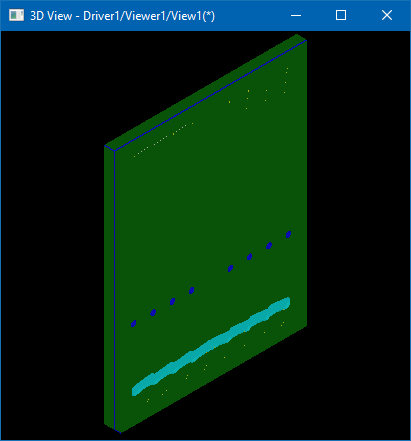
Imported model contains colors as could be seen on attached screenshot from Draw Harness. Could you please clarify which exactly colors are lost / attach screenshot with expected different colors? |
|
|
Thanks for the attention. Maybe I'm doing something wrong (but this is what I use to import all files and all but this work as expected). Please see the attached source: _ it first shows top level shapes: we have a compound with no colours, then three solids (with colours); _ then it shows a tree-like structure of shapes: the compound is still there, but the solids are not, since they are "used" (by the compound I guess). When accessing shapes in this latter way, there's no colour at all. octest.cxx (2,972 bytes) |
|
|
Your code looks very low-level as it doesn't rely on tools like XCAFDoc_ShapeTool::GetFreeShapes(), XCAFDoc_ShapeTool::IsAssembly(), XCAFDoc_ShapeTool::GetReferredShape(), XCAFDoc_ShapeTool::GetSubShapes() - so that I can't foresee what kind of a tree structure it might display. This particular STEP file consists of a single Compound having 9 children. Children are represented by 3 unique Solids instanced 9 times - with different Locations. Each Solid defines a basic surface color, and this color is overridden by some Faces inside Solid. Using XCAFDoc_ShapeTool::GetShape() taking TopoDS_Shape on input might be quite tricky, as shapes should be specified with correct Locations, and color might be specified at every shape level. Tools like XCAFPrs::CollectStyleSettings() might help to create a lookup map of styles. Displaying a Tree in a usual way prints all shape colors in this document.
#include <Message.hxx>
#include <STEPCAFControl_Reader.hxx>
#include <TDataStd_Name.hxx>
#include <TopExp_Explorer.hxx>
#include <XCAFApp_Application.hxx>
#include <XCAFDoc_ColorTool.hxx>
#include <XCAFPrs_DocumentExplorer.hxx>
#include <XCAFDoc_VisMaterial.hxx>
#include <XCAFDoc_ShapeTool.hxx>

static TCollection_AsciiString getLabelName (const TDF_Label& theLabel)
{
  Handle(TDataStd_Name) aNodeName;
  return theLabel.FindAttribute (TDataStd_Name::GetID(), aNodeName)
       ? TCollection_AsciiString (aNodeName->Get())
       : TCollection_AsciiString();
}

static const int THE_NB_COLOR_CAT = 3;
static const XCAFDoc_ColorType THE_COLOR_CATS     [THE_NB_COLOR_CAT] = { XCAFDoc_ColorGen, XCAFDoc_ColorSurf, XCAFDoc_ColorCurv };
static const char*             THE_COLOR_CAT_NAMES[THE_NB_COLOR_CAT] = { "Generic color: ", "Surface color: ", "Curves color: " };

int main (int theNbArgs, char** theArgVec)
{
  Handle(XCAFApp_Application) anApp = XCAFApp_Application::GetApplication();
  Handle(TDocStd_Document) aDoc;
  anApp->NewDocument ("BinXCAF", aDoc);
  STEPCAFControl_Reader aReader;
  if (!aReader.Perform (theArgVec[1], aDoc))
  //if (!aReader.Perform ("c:/11PI0391_F001-Dima_x_B006_B007.stp", aDoc))
  {
    Message::SendFail() << "STEP file '" << theArgVec[1] << "' reading failed";
    return 1;
  }

  for (XCAFPrs_DocumentExplorer aDocExp (aDoc, XCAFPrs_DocumentExplorerFlags_None); aDocExp.More(); aDocExp.Next())
  {
    const XCAFPrs_DocumentNode& aNode = aDocExp.Current();
    TCollection_AsciiString anIndent (aDocExp.CurrentDepth() * 2, ' ');
    TopoDS_Shape aShape;
    XCAFDoc_ShapeTool::GetShape (aNode.RefLabel, aShape);
    std::cout << anIndent << aNode.Id << " " << (!aShape.IsNull() ? TopAbs::ShapeTypeToString (aShape.ShapeType()) : "") << "\n";

    std::cout << anIndent << "Reference name: '" << getLabelName (aNode.RefLabel) << "'\n";
    if (aNode.RefLabel != aNode.Label)
    {
      std::cout << anIndent << "Instance name:  '" << getLabelName (aNode.Label) << "'\n";
    }

    const XCAFPrs_Style& aStyle = aNode.Style;
    if (aStyle.IsSetColorSurf())
    {
      std::cout << anIndent << "Surface color:  "
                << Quantity_ColorRGBA::ColorToHex (aStyle.GetColorSurfRGBA())
                << " [" << Quantity_Color::StringName (aStyle.GetColorSurf().Name()) << "]"
                << "\n";
    }
    if (aStyle.IsSetColorCurv())
    {
      std::cout << anIndent << "Curves color:   "
                << Quantity_Color::ColorToHex (aStyle.GetColorCurv())
                << " [" << Quantity_Color::StringName (aStyle.GetColorCurv().Name()) << "]"
                << "\n";
    }
    if (!aStyle.Material().IsNull())
    {
      std::cout << anIndent << "Material:       "
                << Quantity_ColorRGBA::ColorToHex (aStyle.Material()->BaseColor())
                << " [" << Quantity_Color::StringName (aStyle.Material()->BaseColor().GetRGB().Name()) << "]"
                << "\n";
    }

    if (!aNode.IsAssembly)
    {
      TDF_LabelSequence aLabSeq;
      XCAFDoc_ShapeTool::GetSubShapes (aNode.RefLabel, aLabSeq);
      Quantity_ColorRGBA aColor;
      anIndent = TCollection_AsciiString ((aDocExp.CurrentDepth() + 1) * 2, ' ');
      int aSubShapeIndex = 0;
      for (TDF_LabelSequence::Iterator aShapeIter (aLabSeq); aShapeIter.More(); aShapeIter.Next())
      {
        const TDF_Label& aSubShapeLab = aShapeIter.Value();
        TopoDS_Shape aSubShape;
        if (!XCAFDoc_ShapeTool::GetShape (aSubShapeLab, aSubShape)) { continue; }
        std::cout << anIndent << "Subshape " << TopAbs::ShapeTypeToString (aSubShape.ShapeType()) << " " << ++aSubShapeIndex << "\n";
        for (int aCatIter = 0; aCatIter < THE_NB_COLOR_CAT; ++aCatIter)
        {
          if (aDocExp.ColorTool()->GetColor (aSubShapeLab, THE_COLOR_CATS[aCatIter], aColor))
          {
            std::cout << anIndent << THE_COLOR_CAT_NAMES[aCatIter]
                      << Quantity_ColorRGBA::ColorToHex (aColor)
                      << " [" << Quantity_Color::StringName (aColor.GetRGB().Name()) << "]"
                      << "\n";
          }
        }
      }

      /*for (TopExp_Explorer aFaceExp (aShape, TopAbs_FACE); aFaceExp.More(); aFaceExp.Next())
      {
        TopoDS_Shape aSubShape = aFaceExp.Current();
        std::cout << anIndent << "Subshape " << TopAbs::ShapeTypeToString (aSubShape.ShapeType()) << " " << ++aSubShapeIndex << "\n";
        for (int aCatIter = 0; aCatIter < THE_NB_COLOR_CAT; ++aCatIter)
        {
          if (aDocExp.ColorTool()->GetColor (aSubShape, THE_COLOR_CATS[aCatIter], aColor))
          {
            std::cout << anIndent << THE_COLOR_CAT_NAMES[aCatIter]
                      << Quantity_ColorRGBA::ColorToHex (aColor)
                      << " [" << Quantity_Color::StringName (aColor.GetRGB().Name()) << "]"
                      << "\n";
          }
        }
      }*/
    }

    std::cout << "\n";
  }

  return 0;
}
0:1:1:1. COMPOUND
Reference name: '11PI0391 F001-Dima x B006 B007'

  0:1:1:1./0:1:1:1:1. SOLID
  Reference name: '11PI0391 B006-Stecca 1'
  Instance name:  '11PI0391 B006-Stecca 1.1'
  Surface color:  #FFFF00FF [YELLOW]
    Subshape FACE 1
    Surface color: #008000FF [GREEN4]
    Subshape FACE 2
    Surface color: #008000FF [GREEN4]
    Subshape FACE 3
    Surface color: #FFFFFFFF [WHITE]
    Subshape FACE 4
    Surface color: #FFFFFFFF [WHITE]
    Subshape FACE 5
    Surface color: #FFFFFFFF [WHITE]
    Subshape FACE 6
    Surface color: #FFFFFFFF [WHITE]
...
|
|
|
> Your code looks very low-level as it doesn't rely on tools like XCAFDoc_ShapeTool::GetFreeShapes(),> XCAFDoc_ShapeTool::IsAssembly(), XCAFDoc_ShapeTool::GetReferredShape(), XCAFDoc_ShapeTool::GetSubShapes()> - so that I can't foresee what kind of a tree structure it might display. We are actually able to build all the structure we need; it seems only colors (and possibly also layers) are missing sometimes. I've based my code on: https://dev.opencascade.org/doc/overview/html/occt_user_guides__xde.html I see no mention there of, e.g, XCAFPrs_DocumentExplorer. Where can I find such info? > Using XCAFDoc_ShapeTool::GetShape() taking TopoDS_Shape on input might be quite tricky, as shapes should be specified with correct Locations, and color might be specified at every shape level. Since we already have a complex working system and I'd like to change it as little as possible, does "quite tricky" mean impossible? We can have shape+location: is it possible to get colours from this couple? > Tools like XCAFPrs::CollectStyleSettings() might help to create a lookup map of styles. Again, I see it's reference page, but descriptions are very short. Is there an overview document on all this? Thanks. P.S. I realize this is not a bug, then... so perhaps we should move somewhere else? |
|
|
> P.S. I realize this is not a bug, then... so perhaps we should move somewhere else? Sure, usually such topics are discussed on the Forum. https://dev.opencascade.org/forums/data-exchange-and-application-framework |
|
|
Dear bugmaster, please close the issue as not a bug. |
|
|
Closed. |
| Date Modified | Username | Field | Change |
|---|---|---|---|
| 2021-12-14 16:25 | ventu | New Issue | |
| 2021-12-14 16:25 | ventu | Assigned To | => gka |
| 2021-12-14 16:25 | ventu | File Added: model.zip | |
| 2021-12-14 16:29 | kgv | Summary | Model is imported with no colours => Data Exchange - STEP Model is imported with no colours |
| 2021-12-14 16:31 | kgv | File Added: draw_step_colors.png | |
| 2021-12-14 16:33 | kgv | Note Added: 0105979 | |
| 2021-12-14 16:33 | kgv | Assigned To | gka => ventu |
| 2021-12-14 16:33 | kgv | Status | new => feedback |
| 2021-12-14 16:33 | kgv | Steps to Reproduce Updated | |
| 2021-12-18 20:58 | ventu | Note Added: 0106073 | |
| 2021-12-18 20:58 | ventu | File Added: octest.cxx | |
| 2021-12-19 00:53 | kgv | Note Added: 0106074 | |
| 2021-12-19 00:53 | kgv | Note Edited: 0106074 | |
| 2021-12-19 00:55 | kgv | Note Edited: 0106074 | |
| 2021-12-19 00:55 | kgv | Note Edited: 0106074 | |
| 2021-12-19 00:55 | kgv | Note Edited: 0106074 | |
| 2021-12-19 00:56 | kgv | Note Edited: 0106074 | |
| 2021-12-19 00:59 | kgv | Note Edited: 0106074 | |
| 2021-12-27 17:56 | ventu | Note Added: 0106221 | |
| 2021-12-28 15:27 | kgv | Note Added: 0106231 | |
| 2022-01-11 22:51 | kgv | Assigned To | ventu => bugmaster |
| 2022-01-11 22:51 | kgv | Note Added: 0106305 | |
| 2022-01-11 22:52 | kgv | Description Updated | |
| 2023-01-17 03:42 | vglukhik | Status | feedback => closed |
| 2023-01-17 03:42 | vglukhik | Resolution | open => no change required |
| 2023-01-17 03:42 | vglukhik | Note Added: 0112866 |