

Thu, 04/09/2026 - 00:52
How to remove the white background of a symbol when outputting using OpenCascade's AIS_Textlabel?
Hello everyone, I'm implementing a program for working with shapes using OpenCascade. Please help me remove the white background around a symbol when outputting symbols using OpenCascade's AIS_Textlabel. How can I remove the white background around a symbol?Or is there another way to display text on the stage so that it lies in the plane of the size and does not turn towards the camera when the camera rotates and does not change size when zooming?This is my code:
label = AIS_TextLabel()
label.SetText(str(text))
label.SetPosition(gp_Pnt(*position))
label.SetHeight(height)
label.SetDisplayType(1)
label.SetHJustification(Graphic3d_HTA_CENTER)
label.SetVJustification(Graphic3d_VTA_CENTER)
if hasattr(label, "SetBackdrop"):
label.SetBackdrop(False)
color_obj = Quantity_Color(*color, Quantity_TOC_RGB)
label.SetColor(color_obj)
self._context.Display(label, False)
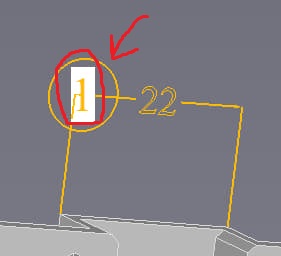
I want to remove the white rectangle around the number one:

Thu, 04/09/2026 - 06:53
This line:
assigns
Aspect_TODT_SUBTITLEstyle to the label, which indeed adds filled background rectangle. Just remove this line to useAspect_TODT_NORMAL, which is default one.You may also try other label styles from
Aspect_TypeOfDisplayTextenumeration (tip - avoid using numbers instead of named enumeration values):Thu, 04/09/2026 - 19:52
Thank you very much, it works.
Could you please tell me how to make sure the text displayed (using AIS_Textlabel) doesn't rotate when the camera is facing it and always stays within the display size?
And could you also please tell me how to make sure the text displayed using AIS_Textlabel doesn't change size when the camera zooms in?
My OCC version is 7.9.0
If I use this code, it doesn't work and the index keeps rotating and zooming when zoomed in:
label = AIS_TextLabel()
label.SetText(str(text))
pnt = gp_Pnt(float(position[0]), float(position[1]), float(position[2]))
label.SetPosition(pnt)
trsf_pers = Graphic3d_TransformPers(Graphic3d_TMF_ZoomPers, pnt)
label.SetTransformPersistence(trsf_pers)
label.SetHeight(25.0)
color_obj = Quantity_Color(color[0], color[1], color[2], Quantity_TOC_RGB)
if hasattr(label, "SetColor"):
label.SetColor(color_obj)
self._context.Display(label, update)
I also tried this option with SetIsZoomable and SetZoomable, but it didn't work either and I got an error('Graphic3d_AspectText3d' object has no attribute 'SetIsZoomable'):
drawer = text_label.Attributes()
text_aspect = drawer.TextAspect()
try:
text_aspect.SetIsZoomable(False)
except AttributeError:
text_aspect.Aspect().SetIsZoomable(False)
text_label.SetHeight(20.0)
I want the output text "1" to lie in the size plane and not turn towards us while the camera is moving, and so that it does not change its size when the camera zoom changes.
In the first photo, the text is rotated, in the second photo, the magnification is "1" when the camera is moving away: